What Is a Risk Register? Definition, Elements, and How to Create One
Quick Answer
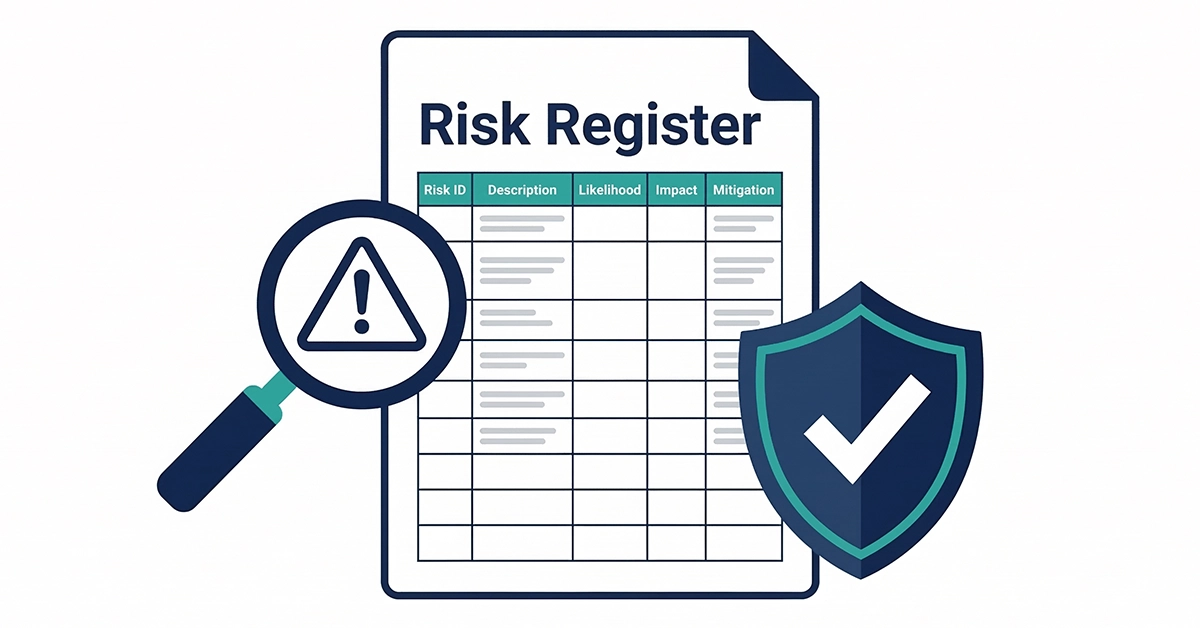
A risk register is a structured document used to identify, record, analyse, and manage risks throughout a project or business process. It typically includes the risk description, category, likelihood, potential impact, a calculated risk score, the assigned owner, and the mitigation plan. Risk registers are created at the start of a project and updated continuously throughout its lifecycle to ensure proactive management.
Introduction
Every project faces uncertainty. Deadlines can slip, budgets can overrun, team members can leave, and external factors can change without warning. A risk register is the tool that helps project managers, business analysts, and teams get ahead of these uncertainties before they become problems.
This guide covers what a risk register is, what it should include, how to create one step by step, and how it differs from similar tools like a risk log and a risk assessment. You will also find a practical example of what a risk register looks like in use on a real business analysis project.
In This Article
What Is a Risk Register? Definition and Purpose
A risk register is a living document that records all identified risks for a project or organisation, along with information about each risk’s likelihood, potential impact, and the actions being taken to manage it. It is sometimes called a risk log, a risk tracker, or a risk repository.
The primary purpose of a risk register is to give the project team and stakeholders a single, up-to-date view of all known risks. Rather than responding to problems after they occur, a risk register enables proactive risk management — identifying threats early and putting mitigation plans in place before they can affect the project.
| Purpose of a Risk Register | Who Uses It |
|---|---|
| Create a central record of all known project risks | Project managers — to oversee and report on risks |
| Assess and prioritise risks by likelihood and impact | Business analysts — to identify requirements-related risks |
| Assign ownership so each risk has a responsible person | Risk managers — to manage organisational risk exposure |
| Track mitigation actions and their progress | Sponsors and stakeholders — to understand project risk status |
| Provide an audit trail of risk management decisions | Operations teams — for ongoing business risk monitoring |
What Does a Risk Register Look Like?
A risk register is typically presented as a table — either in a spreadsheet (Excel, Google Sheets), a project management tool (Jira, Microsoft Project, Smartsheet), or a document format. Each row represents one identified risk, and each column captures a specific piece of information about that risk.
Here is what a typical risk register looks like:
| Risk ID | Risk Description | Category | Likelihood | Impact | Risk Score | Owner | Status | Mitigation Plan |
|---|---|---|---|---|---|---|---|---|
| R-001 | Key developer leaves mid-project | Resource | Medium | High | 6 | PM | Open | Cross-train team member as backup |
| R-002 | Requirements change after sign-off | Scope | High | High | 9 | BA | Open | Change control process in place |
| R-003 | Third-party API unavailable at launch | Technical | Low | High | 3 | Tech Lead | Open | Identify alternative API provider |
| R-004 | Budget increase required for testing phase | Financial | Medium | Medium | 4 | PM | Mitigated | Reserve budget allocated in plan |
| R-005 | Regulatory approval delayed | Compliance | Low | High | 3 | Sponsor | Monitoring | Early engagement with regulator |
Elements of a Risk Register
A complete risk register should capture the following information for each identified risk. Not all projects need every field — simpler projects may use a shorter format, but the core fields should always be present.
| Field | Description | Required? |
|---|---|---|
| Risk ID | A unique identifier for each risk (e.g., R-001, R-002). Allows easy reference in meetings and reports. | Required |
| Risk Description | A clear, concise statement of what could go wrong. Should describe the risk event, not the consequence. | Required |
| Risk Category | The type of risk — common categories include Technical, Resource, Schedule, Financial, Compliance, and External. | Required |
| Likelihood | How probable is it that this risk will occur? Rated as Low, Medium, or High (or numerically 1-5 on larger projects). | Required |
| Impact | How serious would the consequences be if this risk occurs? Rated as Low, Medium, or High. Consider impact on cost, schedule, quality, and scope. | Required |
| Risk Score | A calculated score based on Likelihood x Impact. Allows risks to be ranked by priority so the team focuses on the highest-scoring risks first. | Required |
| Risk Owner | The person responsible for monitoring this risk and implementing the mitigation plan. Every risk must have a named owner. | Required |
| Mitigation Plan | The action(s) being taken to reduce the likelihood or impact of the risk. Should be specific and actionable, not vague. | Required |
| Risk Status | The current state of the risk — typically Open, Monitoring, Mitigated, or Closed. Updated at each review cycle. | Required |
| Date Identified | When the risk was first raised. Useful for audit trails and trend analysis. | Recommended |
| Contingency Plan | What the team will do if the risk actually occurs (the mitigation plan has failed). Separate from the mitigation plan. | Recommended |
| Review Date | When this risk will next be formally reviewed. Ensures the register stays up to date throughout the project. | Recommended |
How to Create a Risk Register: Step-by-Step Guide
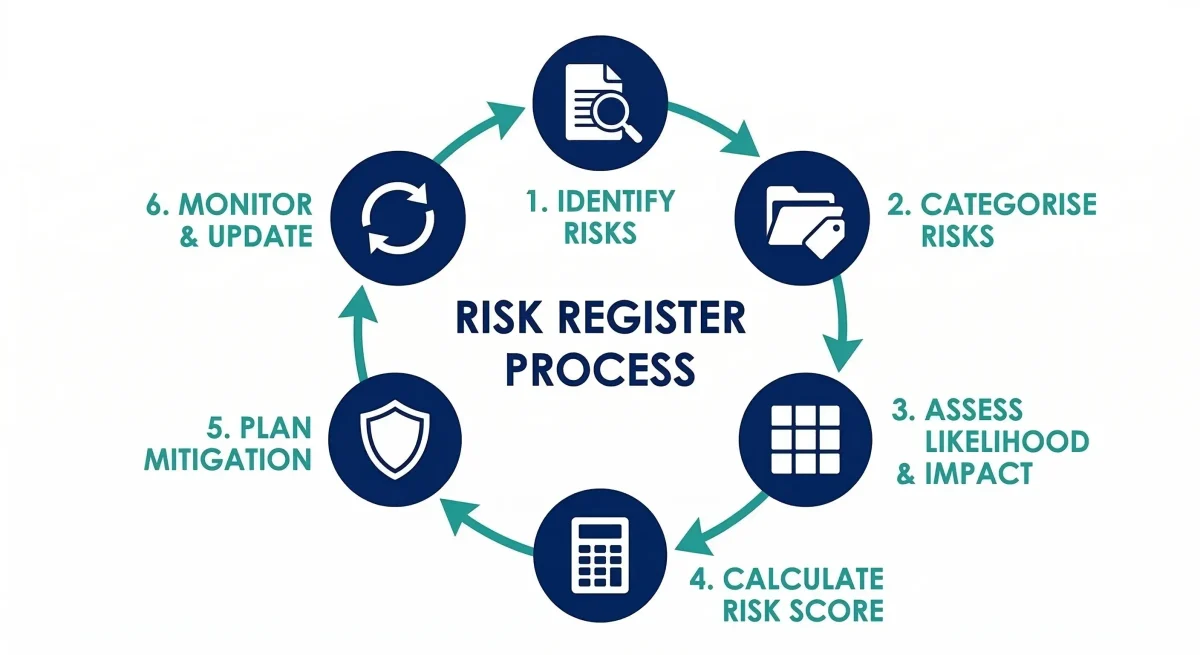
Creating a risk register does not require specialist software. A spreadsheet is sufficient for most projects. What matters is following a consistent process so that risks are identified systematically and managed proactively throughout the project lifecycle.
Step 1: Identify Risks
Bring together key project stakeholders — the project manager, business analyst, technical lead, and subject matter experts — for a risk identification session. Use techniques such as brainstorming, reviewing similar past projects, interviewing team members, and analysing the project plan for dependencies and assumptions. Every potential risk should be captured at this stage, even if it seems unlikely. Do not filter or dismiss risks during identification.
Step 2: Categorise Each Risk
Group each identified risk into a category. Common categories include Technical (e.g., system integration failures), Resource (e.g., staff availability), Schedule (e.g., dependency delays), Financial (e.g., budget overruns), Compliance (e.g., regulatory requirements), and External (e.g., third-party supplier risks). Categorising risks helps the team see patterns and assign appropriate owners.
Step 3: Assess Likelihood and Impact
For each risk, the team assesses two dimensions: how likely is it to occur, and how serious would the impact be if it did? Use a consistent scale — Low, Medium, High is the most common. For larger or more complex projects, a numerical scale (1-5 for both likelihood and impact) gives more granularity. Assess each risk independently and avoid letting one person’s opinion dominate the assessment.
Step 4: Calculate the Risk Score
Multiply the likelihood rating by the impact rating to produce a risk score. For a Low-Medium-High scale, assign values of 1, 2, and 3. A High Likelihood (3) x High Impact (3) risk scores 9 — the maximum and a signal for immediate action. A Low Likelihood (1) x Low Impact (1) scores 1 — the minimum, to be monitored but not prioritised. Sort the register by risk score to focus attention on the highest-priority items first.
Step 5: Assign Risk Owners
Every risk must have a named owner — a specific person, not a team or role. The risk owner is responsible for monitoring the risk, implementing the mitigation plan, and escalating if the risk changes status. On most projects, the project manager owns high-priority risks, while the BA owns requirements-related risks and the technical lead owns technical risks.
Step 6: Define Mitigation and Contingency Plans
For each risk, document the mitigation plan (what will be done to reduce the likelihood or impact before the risk occurs) and the contingency plan (what will be done if the risk occurs despite the mitigation). Mitigation actions should be specific and assigned to a person with a target date. Vague plans like “monitor closely” or “escalate if needed” are not sufficient — they provide no real protection.
Step 7: Monitor and Update Regularly
A risk register is a living document. It should be reviewed at every project status meeting — typically weekly or fortnightly depending on project pace. At each review, update the status of existing risks (has anything changed?), close risks that have passed, add newly identified risks, and re-assess scores if the project context has changed. A risk register that is created once and never updated provides no real value.
Risk Register in Project Management
In project management, the risk register is one of the core project documents alongside the project plan, RACI matrix, and requirements specification. It is typically created during the planning phase of a project and maintained throughout the execution and monitoring phases.
Different project management methodologies approach risk registers slightly differently:
| Methodology | How Risk Registers Are Used |
|---|---|
| Waterfall / Traditional PM | Risk register created during planning phase. Formal review process at each phase gate. Updated by the project manager with input from the BA and technical team. |
| Agile / Scrum | Risks are often managed as a backlog of impediments or maintained as a risk register in Confluence or Jira. Reviewed at sprint retrospectives and backlog grooming sessions. Less formal but equally important. |
| PRINCE2 | Risk register is a mandatory PRINCE2 document, formally defined in the methodology. Includes specific fields for risk appetite, risk tolerance, and proximity (how soon the risk might occur). |
| Business Analysis (BABOK) | Business analysts are responsible for identifying requirements-related risks. The BA contributes to the risk register by surfacing risks around scope, stakeholder alignment, requirements quality, and solution feasibility. |
Risk Register vs Risk Log: What Is the Difference?
The terms risk register and risk log are often used interchangeably, but in formal project management practice they can have slightly different meanings depending on the methodology being used.
| Risk Register | Risk Log | |
|---|---|---|
| Definition | A comprehensive document recording all identified risks with full detail — likelihood, impact, owner, mitigation, and contingency. | A simpler list or diary-style record of risks as they are raised, often without full likelihood/impact assessment. |
| Formality | More formal. Required in methodologies like PRINCE2 and PMBOK. | Less formal. Often used interchangeably with “risk register” in practice. |
| Content | Includes risk scores, mitigation plans, contingency plans, and current status. Updated regularly. | May contain only the risk description, date raised, and who raised it. Less analytical. |
| Common usage | Larger, more complex projects. Corporate risk management. Regulated industries. | Smaller projects. Internal teams. Informal Agile environments. |
Risk Register vs Risk Assessment: Key Differences
A risk register and a risk assessment are related but different things. This is one of the most common points of confusion for people new to project management and business analysis.
| Risk Assessment | Risk Register | |
|---|---|---|
| What it is | A process or activity — the act of identifying and evaluating risks. | A document or tool — the output of the risk assessment process. |
| Purpose | To evaluate the nature and severity of risks at a point in time. | To record, track, and manage risks on an ongoing basis. |
| Timing | Can be a one-time exercise (e.g., before a project starts). | Created during planning and maintained throughout the entire project. |
| Format | Often a report or analysis document. Can include risk matrices, heat maps, and narrative. | Always a structured table or database of individual risk records. |
| Relationship | The risk assessment feeds INTO the risk register. | The risk register is the ongoing management tool created as a result of the risk assessment. |
Want to develop business analysis and risk management skills for your career? Techcanvass’s ECBA training for business analysts covers requirement analysis, risk identification, stakeholder management, and the business analysis fundamentals you need to work confidently on complex projects.
Conclusion
A risk register is not just a compliance document — it is a practical tool that helps project teams stay in control of uncertainty. When created early, maintained consistently, and reviewed regularly, a risk register transforms risk management from a reactive scramble into a proactive, structured process.
For business analysts, understanding how to contribute to and maintain a risk register is a core professional skill. Whether you are working on your first project or preparing for ECBA or CBAP certification, risk management is an area that will come up repeatedly throughout your BA career.
Frequently Asked Questions: Risk Register