ChatGPT Prompts for Business Analysts (That Save 5 Hours/Week)
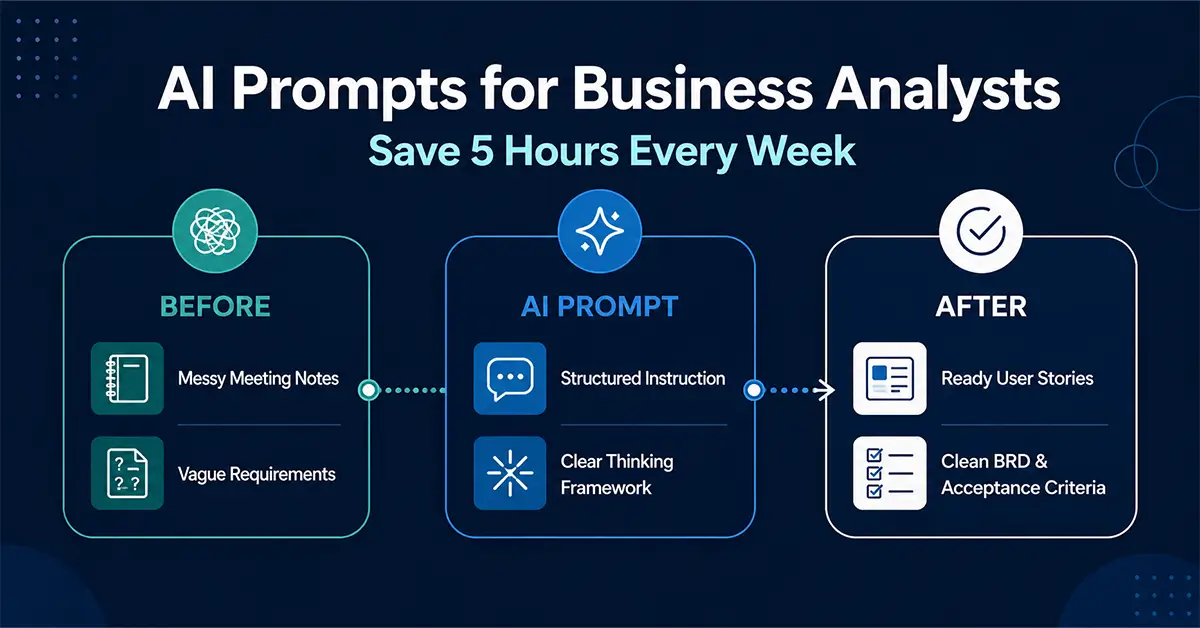
ChatGPT prompts for business analysts are no longer a “nice-to-have”—they are quietly becoming the difference between a BA who is constantly overloaded and one who consistently delivers faster, clearer, and smarter outputs.
If you’re a business analyst today, your day probably looks like this: back-to-back meetings, messy notes, unclear requirements, last-minute stakeholder asks, and documentation that never seems to end. The real problem isn’t the work—it’s the repetition inside the work.
This is where AI prompts change the game.
Instead of writing everything from scratch, you start thinking in prompts. And that shift alone can easily save 4–6 hours every week.
Let’s break down the exact prompts that are working in real BA workflows right now.
Quick Answer: What Are AI Prompts for Business Analysts?
AI prompts are structured instructions that help tools like ChatGPT convert raw inputs (notes, requirements, data) into structured outputs (user stories, summaries, insights, documents). Think of them as shortcuts for your thinking process.
Preview — desktop
Key Facts About ChatGPT Prompts for BAs
| Area | Impact |
|---|---|
| Time Saved | 4–6 hours per week |
| Biggest Use Case | Documentation & analysis |
| Skill Needed | Clear thinking, not coding |
| Output Improvement | Higher clarity & consistency |
| Adoption Trend | Rapidly growing in Agile teams |
Preview — mobile (resize browser below 640px to see)
AI Prompt for Converting Requirements into User Stories
Let’s start with one of the biggest time drains—turning raw requirements into user stories.
You sit in a meeting. Stakeholder explains something vaguely. You interpret it. Then rewrite it. Then structure it. Then refine it.
Now replace that process with this:
Convert the following requirement into user stories with acceptance criteria using Given-When-Then format.
Here’s what changes in real life:
Instead of spending 20–30 minutes per requirement, you get a structured draft in seconds. More importantly, the AI doesn’t miss edge cases easily—it often expands your thinking.For example, a simple request like “User should be able to reset password” becomes multiple stories covering validation, error handling, and flows.
-
What you actually save: time + mental effort
-
What you actually gain: better coverage
Your role shifts from “writer” to “quality reviewer”—which is exactly where a BA adds more value.
AI Prompt for Stakeholder Meeting Summarization
Meetings are unavoidable. But rewriting them shouldn’t be.
Most BAs spend time converting messy notes into MOM (Minutes of Meeting). And let’s be honest—this is pure effort, not value creation.
meeting notes into key decisions, action items, and risks..
In real scenarios, this is a game changer.
Paste your rough notes (even unstructured ones), and you get:
- Clear decisions
- Defined action items
- Identified risks
What used to take 30 minutes now takes 3 minutes.
Even better—your communication becomes sharper. Stakeholders don’t want transcripts; they want clarity.
-
Real impact: faster follow-ups, fewer misunderstandings, better alignment
AI Prompt for Gap Analysis Between Current and Future State
Gap analysis is where BAs are expected to “think deeply.” But a lot of time goes into just structuring that thinking.
“Compare the current state and future state below and identify gaps,risks, and dependencies .
In real-world projects—especially digital transformation—this prompt accelerates clarity.
Example:
- Current: manual approvals
- Future: automated workflow
AI quickly highlights:
- Missing integrations
- Process redesign needs
- Potential risks
Instead of staring at documents trying to “figure things out,” you get a structured starting point.
-
Your role becomes: validating insights, not generating from scratch
AI Prompt for Writing Business Requirement Documents (BRD)
BRDs are important—but they are also repetitive.
Every BA knows the sections:
- Scope
- Objectives
- Stakeholders
- Requirements
Yet we rebuild them every time.
“Create a Business Requirement Document using thefollowing inputs. .
Now imagine this:
After a requirement session, you feed inputs once—and get a complete draft.
You’re not replacing your work—you’re accelerating it.
Instead of spending hours formatting and structuring, you focus on:
- Accuracy
- Completeness
- Stakeholder alignment
-
Big shift: from document creator → document validator
AI Prompt for Creating Test Scenarios from Requirements
Testing gaps often come from unclear requirements.
And writing test scenarios manually? It’s repetitive and easy to miss edge cases.
“Generate test scenarios and edge cases from thefollowing user story .
In real use:
- Login feature → AI generates invalid login, session timeout, multi-device scenarios
- Payment feature → AI suggests failure, retry, timeout flows
This improves collaboration with QA teams immediately.
-
Outcome: stronger requirements + better testing coverage
AI Prompt for Data Analysis Insights
Not every BA is a data analyst—but every BA deals with data.
The challenge is turning numbers into insights quickly.
“Analyze the following data and provide trends, anomalies,and insights” .
In real projects:
- Sales drop → AI highlights region-specific decline
- User behavior → AI detects unusual spikes
This reduces the time spent “figuring out what’s happening.”
-
Value shift: from data reading → decision support
AI Prompt for Writing Clear Acceptance Criteria
Vague acceptance criteria = confusion during development.
And rewriting them again later = wasted effort.
criteria usingGiven-When-Then format..
What happens in reality:
- Developers understand faster
- QA tests better
- Fewer back-and-forth discussions
This is one of the simplest prompts—but one of the highest impact ones.
AI Prompt for Risk Identification in Projects
Risk discussions often happen late—when issues already exist.
“Identify risks, assumptions, and mitigation strategies for thefollowing project.” .
This helps you think ahead.
In real scenarios:
- Integration risks
- Timeline risks
- Dependency risks
AI gives you a checklist mindset instantly.
AI Prompt for Creating Process Flow Descriptions
Process documentation is necessary—but tedious.
“Convert the following process into astep-by-step workflow.” .
Instead of manually structuring flows, you get clarity instantly.
This is especially useful when dealing with complex workflows like onboarding, approvals, or transactions.
AI Prompt for Rewriting Technical Content for Business Users
One of the core BA responsibilities—bridging business and tech.
And this is harder than it sounds.
“Rewrite the following technical content in simplebusiness language” .
This ensures:
- Stakeholders understand faster
- Fewer clarification calls
- Better alignment
Preview — In article context
FAQs: ChatGPT Prompts for Business Analysts
Common questions BAs ask before adopting AI prompts in their daily workflow.
Q1 What are AI prompts for business analysts?
Q2 How much time can AI prompts actually save?
Q3 Do AI prompts reduce the role of a business analyst?
Q4 Are AI prompts difficult to use?
Q5 Which tools are best for AI prompts?
Q6 Can AI prompts improve requirement quality?
Q7 Are AI-generated outputs reliable?
Q8 Can AI prompts be used in Agile environments?
Q9 What is the biggest benefit of using AI prompts?
Q10 What is the future of AI in business analysis?
Click any FAQ to expand. Resize browser below 640px for mobile.
Related Post
- Business Analysis | AI Certification For Business Analysts | Business Analysis Home | Latest On Our Blog Home | Mid Level BA Hub
AI Business Analyst: Bridging AI Technology and Business Strategy [Free Downloadable AI Prompts PDF]
Overview AI is a game-changer now, not just a trendy term. Companies are investing heavily in AI-driven solutions in the hopes of making better decisions, becoming more efficient, and gaining a competitive advantage. The catch is that AI by itself is insufficient. The AI business analyst fills this gap by acting as a strategist, interpreter,…
What’s the Future of Requirement Gathering in a World With AI?
Overview There’s something oddly comforting about a well-run requirement gathering session. People in a room (or on Zoom), whiteboards filled with notes, sticky notes everywhere, maybe someone drawing a flowchart, someone else going on a passionate monologue about a feature that might never get built… And somewhere in the middle of all that, a Business…
5 AI Prompts That Will Seriously Cut Your Data Cleaning Time in Half
Introduction Honestly—tidying up raw datasets is tedious. It’s repetitive, takes forever, and tends to be the least enjoyable part of the job. In fact, many analysts and data engineers spend over half their time just prepping data before diving into any analysis. That’s where AI Prompts can make a huge difference—streamlining tedious tasks and saving…